Features How It Works Explore FAQ Download UlamHub

What's Cooking Today?

UlamHub turns a shared TikTok, grandma's handwritten notebook, or whatever's sitting in your fridge into a recipe you'll actually cook โ€” then plans your week and builds the grocery list around it.

๐Ÿ“Ž Import from Instagram, TikTok & YouTube ๐Ÿค– AI help, start to finish ๐Ÿ‘ช Share your whole cookbook, not just one recipe
๐Ÿงช Leftover Alchemist
๐Ÿ—“๏ธ Auto-filled this week
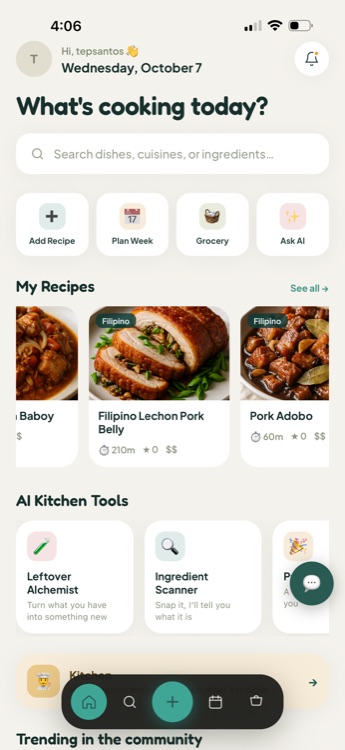
UlamHub home screen with a search bar, quick actions for Add Recipe, Plan Week, Grocery and Ask AI, and a row of saved recipes
What is UlamHub

A recipe app that actually cooks with you

UlamHub started as a home for Filipino ulam โ€” the everyday dishes that go with rice โ€” and grew into a kitchen companion for whatever you're actually cooking. Save recipes from anywhere, lean on an AI sous-chef when you're stuck, and let UlamHub turn your week into a plan and your plan into a grocery list.

๐Ÿ“ฒ Import from anywhere ๐Ÿง  AI help when you need it ๐Ÿ‘ช Share with anybody, not just one link
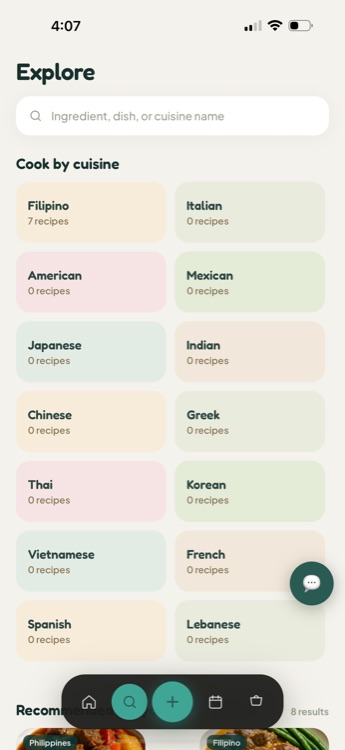
Explore screen showing a grid of cuisines to cook by, including Filipino, Italian, American and Mexican
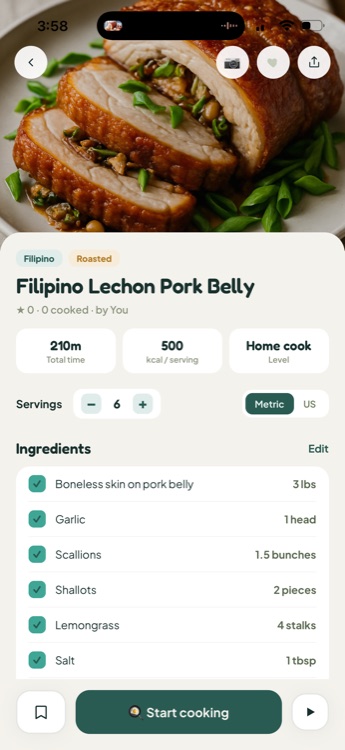
Recipe detail screen for Filipino Lechon Pork Belly showing total time, calories per serving, and an ingredient checklist
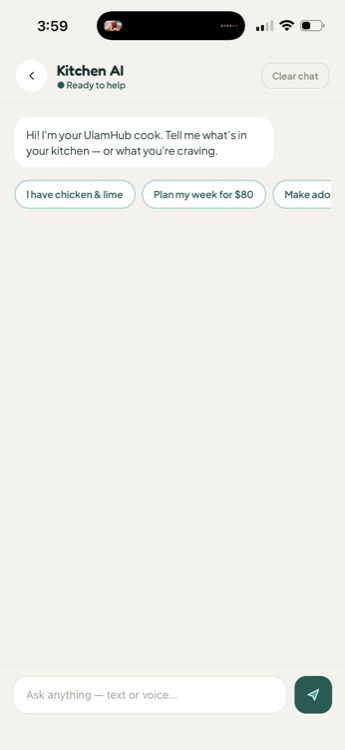
Kitchen AI chat screen with suggested prompts like I have chicken and lime, and Plan my week for $80
How UlamHub works

From "what do I have" to "it's done"

Five real steps, start to finish โ€” this is the actual flow in the app, not a simplified version of it.

1

Add it โ€” however it comes to you

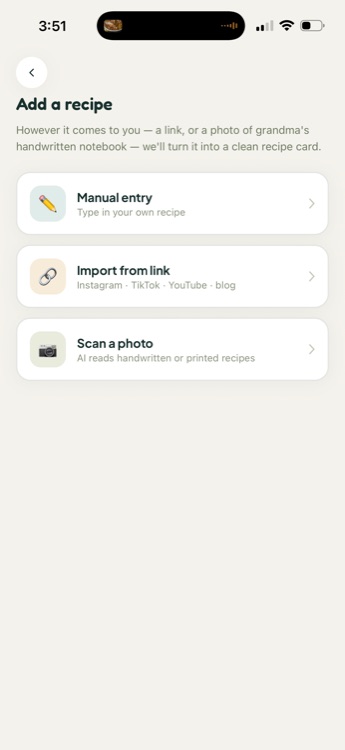
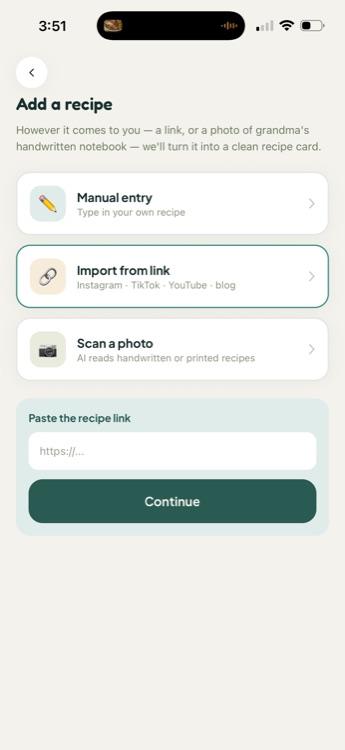
Type a recipe in yourself, paste a link, or snap a photo of a handwritten notebook.

Add a recipe screen with Manual entry, Import from link and Scan a photo options
2

Review the card

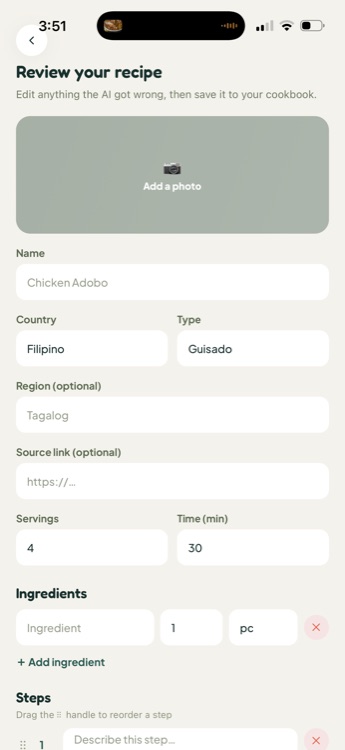
AI fills in the ingredients, steps and nutrition โ€” you fix anything it missed before saving.

Review your recipe screen with editable name, country, servings, ingredients and steps fields
3

Plan your week

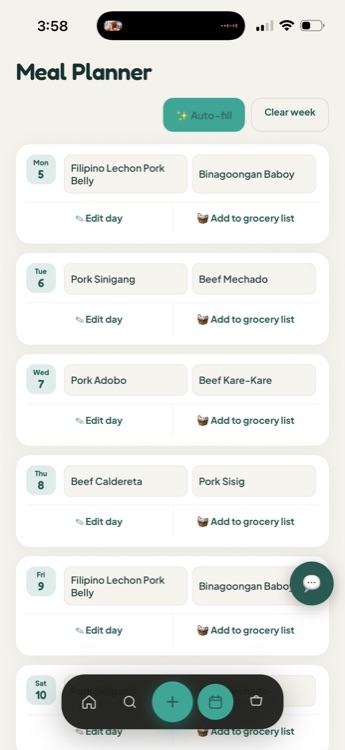
Every day starts with two dish placeholders โ€” tap Auto-fill to have UlamHub pick from your saved recipes, or fill them yourself. Need more than two? Add as many dishes as you want.

Meal Planner screen showing a week grid with two dish placeholders per day
4

Shop on your terms

Tap Add to grocery list on any day โ€” its ingredients land on your list, combining with whatever's already there instead of duplicating it.

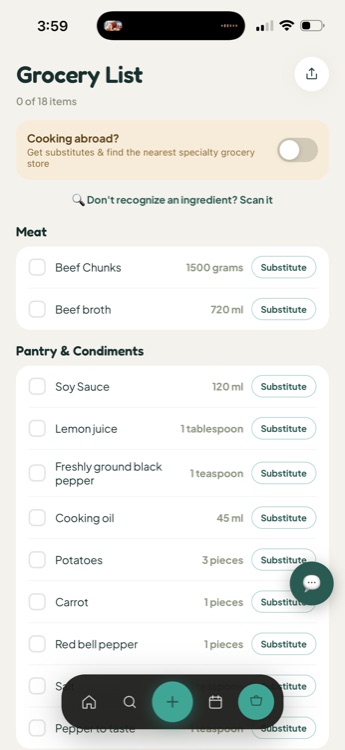
Grocery List screen with checkable ingredients grouped by category and a Substitute button on each item
5

Cook, hands-free

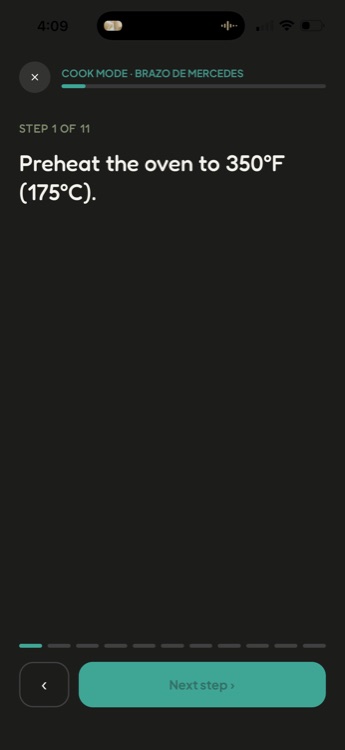
Start Cooking drops you into Cook Mode โ€” one step at a time, full screen, with timers built in.

Cook Mode showing step 1 of 7 in large text with a Start timer button
Feature showcase

Everything that makes it to your table

Pulled straight from the app โ€” each one does exactly what it says.

๐Ÿ”—

Recipe import

Add Any Recipe, Any Way

Type it in yourself, snap a photo of a handwritten notebook, or just hit Share on an Instagram, TikTok or YouTube post and pick UlamHub โ€” it opens straight into the import, link already in hand. AI reads it and builds a clean, structured recipe card.

Import from link screen with a field to paste an Instagram, TikTok, YouTube or blog URL
๐Ÿ’ฌ

AI assistant

Kitchen AI, Your Sous-Chef

Ask it anything, by text or voice: what to make with what's on hand, a whole week planned to a budget, or a quick cooking question.

Kitchen AI chat screen with a text input that says Ask anything, text or voice
๐Ÿงช

AI kitchen tool

Leftover Alchemist

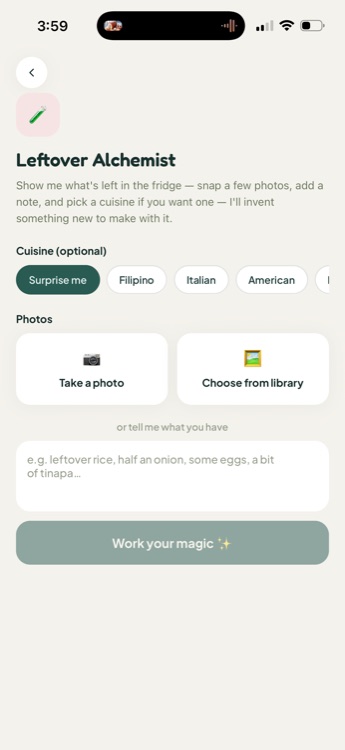
Snap a few photos of your fridge or pantry, pick a cuisine if you're craving one, and it invents a new dish built around what you already have.

Leftover Alchemist screen with cuisine chips, a Take a photo button, and a Work your magic button
๐Ÿ”

AI kitchen tool

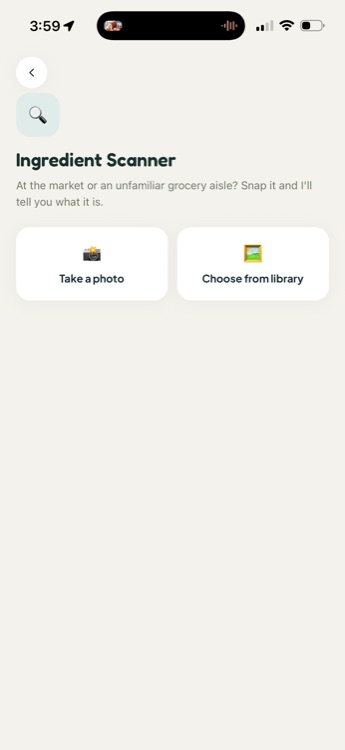
Ingredient Scanner

At the market or an unfamiliar grocery aisle, snap a photo of an ingredient you don't recognize and get told what it is.

Ingredient Scanner screen with Take a photo and Choose from library buttons
๐Ÿ—“๏ธ

Planning

Meal Planner

No fixed meal types โ€” just dishes. Every day starts with two placeholders; tap Auto-fill to have UlamHub pick from your saved recipes, fill them yourself, or tap + Add a dish for as many more as you want.

Meal Planner week grid with an Auto-fill button
๐Ÿงบ

Shopping

Smart Grocery List

You're in control of what lands here โ€” tap Add to grocery list on any day in your plan, and its ingredients merge in, combining with anything already on the list instead of duplicating it. Tap Substitute on anything you can't find, or turn on Cooking Abroad mode for substitutes and the nearest specialty store.

Grocery List with a Cooking abroad toggle and Substitute buttons next to each ingredient
๐ŸŽ‰

Entertaining

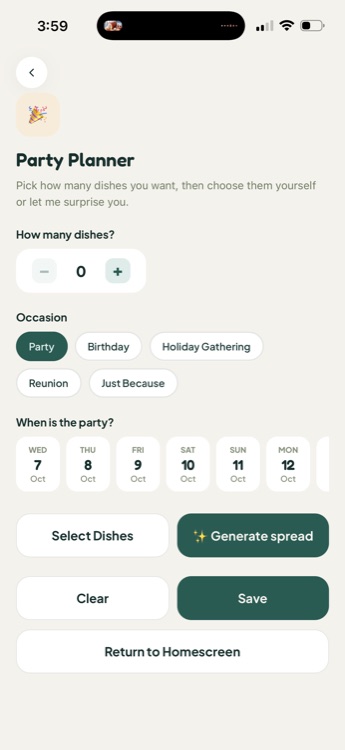
Party Planner

Pick how many dishes you need and the occasion, add a date, and generate a full spread โ€” or choose every dish yourself.

Party Planner screen with a dish-count stepper, occasion chips and a Generate spread button
โœฆ Rare among recipe apps

Share Your Whole Cookbook โ€” Not Just One Recipe

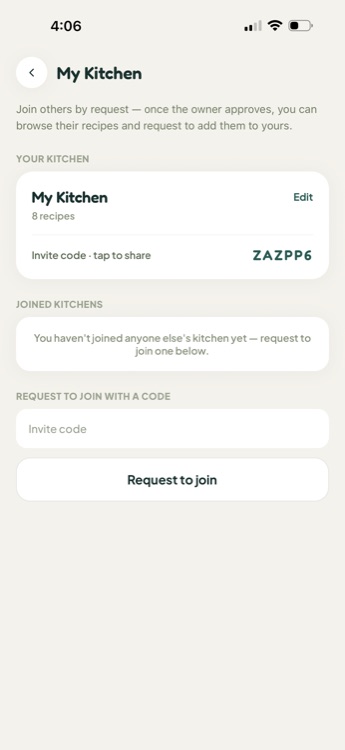
Most recipe apps only let you send a single link at a time. UlamHub's Shared Kitchen hands out an invite code to your entire collection โ€” family, roommates, a group chat, anybody โ€” with no separate account system to manage.

Share your invite code with anybody โ€” not limited to family
They request to join; you approve who gets in
Once in, browse and add from each other's full recipe collection โ€” not just whatever gets sent your way
Shared Kitchen screen showing an invite code to share and a field to request to join another kitchen
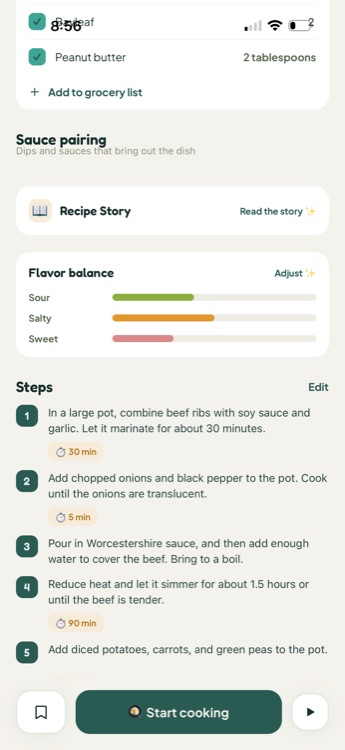
Recipe detail showing sauce pairing, recipe story, and a flavor balance chart for sour, salty and sweet
Recipe detail top section for Filipino Lechon Pork Belly with a servings stepper and Metric or US unit toggle
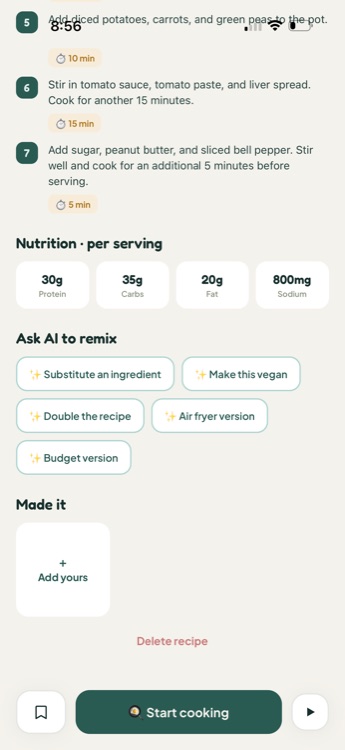
Recipe detail nutrition panel and Ask AI to remix chips including Make this vegan and Air fryer version
Every recipe, fully loaded

A recipe page that does the work for you

Nutrition, estimated per serving

Protein, carbs, fat and sodium, calculated for the actual serving size โ€” not the whole pot.

Flavor balance at a glance

Sour, salty and sweet, visualized so you know what a dish actually tastes like before you cook it.

A short recipe story

Where the dish comes from, on tap, for the ones you want the backstory on.

Ask AI to remix

Substitute an ingredient, make it vegan, double it, or get an air-fryer or budget version โ€” without leaving the recipe.

Servings and units that actually convert

Scale servings up or down and flip between Metric and US โ€” every ingredient updates with it.

Cook Mode full-screen view with large step text and a Next step button

Then, Start Cooking drops you into Cook Mode

One step at a time, full screen, with timers built in โ€” so you're never hunting for your place in a wall of text with flour on your hands.

See it in action

How to actually use UlamHub

Real screens, real taps โ€” two of the most common things you'll do, step by step.

01

How to bring in a recipe from Instagram, TikTok or YouTube

Two ways in, same destination โ€” whichever is faster in the moment.

THE FAST WAY

Right from the post or video, tap Share and choose UlamHub โ€” the app opens straight into the import, link already in hand.

UlamHub opening directly into the recipe import after being chosen from another app's native Share sheet
OR, MANUALLY

Open Add Recipe, choose Import from link, and paste the URL yourself.

Paste the recipe link field with a Continue button
EITHER WAY

Review what the AI pulled out, fix anything it missed, and save it to your cookbook.

Review your recipe screen ready to edit and save
02

How to plan the week and shop on your terms

STEP 1

In Meal Planner, tap Auto-fill for two dishes a day pulled from your saved recipes, or fill each day yourself.

Meal Planner with the Auto-fill button at the top
STEP 2

On any day you're ready to shop for, tap Add to grocery list โ€” meal planning never adds anything on its own.

A day card in Meal Planner with an Add to grocery list button
STEP 3

Open Grocery List โ€” ingredients from every day you added combine automatically. Tap Substitute on anything you can't find.

Grocery List with combined ingredients and a Substitute button

Discover โ†’ Cook โ†’ Plan โ†’ Shop

Explore screen with a grid of cuisines
Discover
Browse by cuisine
Recipe detail screen
Open a recipe
Everything on one page
Cook Mode screen
Cook
One step at a time
Meal Planner screen
Plan
Auto-fill the week
Grocery List screen
Shop
One combined list
Kitchen AI chat screen
Ask Kitchen AI
Whenever you're stuck
Why it's different

Less deciding. Less duplicate shopping. More cooking.

๐Ÿค”

Spend Less Time Deciding

Browse by cuisine or ask Kitchen AI what to make โ€” no more staring into the fridge.

๐Ÿ“’

Never Lose a Recipe Again

However you found it โ€” a link, a video, a handwritten note โ€” it lives in your cookbook for good.

๐Ÿ›’

Stop Buying Things You Already Have

Add whichever days you're actually shopping for, and the same ingredient across them combines instead of duplicating.

๐Ÿ“

Cook With Confidence

Nutrition, flavor balance, and clear numbered steps with timers, right on every recipe.

โ™ป๏ธ

Waste Less, Cook More

Leftover Alchemist turns what's already in your kitchen into tonight's dinner.

๐Ÿ 

Cook From the Same Collection as Anybody

Share an invite code โ€” family, roommates, friends โ€” and cook from the same collection, wherever everyone is.

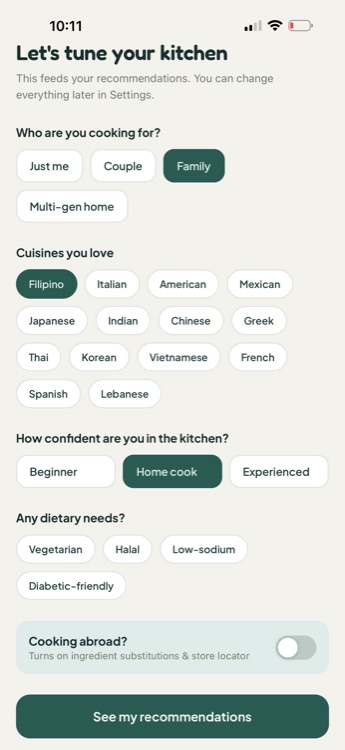
Onboarding quiz asking who you're cooking for, cuisines you love, kitchen confidence and dietary needs
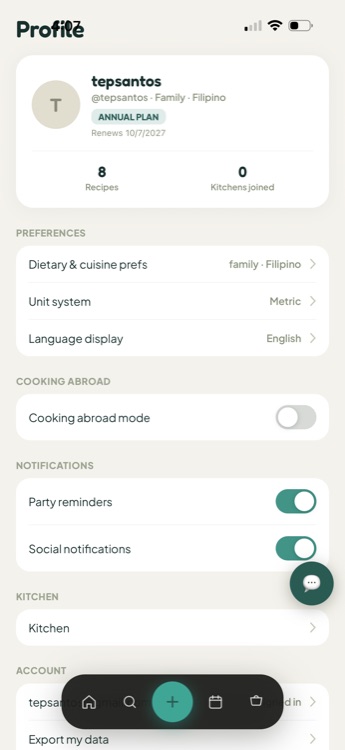
Profile screen with dietary and cuisine preferences, unit system and notification settings
Built around you

UlamHub learns who's actually cooking

A short quiz up front โ€” who you're cooking for, the cuisines you love, how confident you are in the kitchen, and any dietary needs โ€” feeds your recommendations from day one. Change any of it later from your Profile.

Just me / Couple / Family / Multi-gen home Beginner โ†’ Experienced Vegetarian ยท Halal ยท Low-sodium ยท Diabetic-friendly Cooking abroad mode
Where it started

Rooted in ulam. Built for everything you cook.

Ulam means the everyday dish Filipinos eat with rice โ€” and it's where UlamHub started. Today it sits side by side with cuisines from around the world, so the app flexes to whatever's actually in your kitchen this week.

Filipino Italian American Mexican Japanese Indian Chinese Greek Thai Korean Vietnamese French Spanish Lebanese
Cook by cuisine grid including Filipino, Italian, American, Mexican, Japanese and Indian

Your Next Meal Is Waiting.

UlamHub is in final testing on iOS and Android.

Coming soon to theApp Store Coming soon toGoogle Play
FAQ

Questions, answered

What is UlamHub?+
UlamHub is a recipe app rooted in Filipino home cooking and built for every cuisine. You can save recipes from anywhere, get help from an AI sous-chef, plan your week, and shop with a grocery list that builds itself.
What cuisines can I cook with UlamHub?+
Filipino, Italian, American, Mexican, Japanese, Indian, Chinese, Greek, Thai, Korean, Vietnamese, French, Spanish and Lebanese are all built into Explore today โ€” browse by cuisine or search for a specific dish or ingredient.
How do I add a recipe I found online or on social media?+
The fast way: right from the post or video, tap Share and choose UlamHub โ€” the app opens straight into the import, link already in hand. Or do it manually: from Add Recipe, choose Import from link and paste a URL from Instagram, TikTok, YouTube, or a blog. Either way, AI reads the content and builds a clean recipe card you can review and save.
Can UlamHub read a photo of a handwritten recipe?+
Yes โ€” choose Scan a photo from Add Recipe and AI reads a handwritten or printed recipe straight from the photo.
What can Kitchen AI actually do?+
Kitchen AI is a chat assistant inside the app โ€” ask it what to cook with what you have, have it plan your week to a budget, or ask it a cooking question, by text or voice.
Does UlamHub help me use up leftovers?+
Yes โ€” Leftover Alchemist takes a few photos of what's left in your fridge or pantry, an optional cuisine preference, and invents a dish built around it.
Does UlamHub build a grocery list for me?+
It builds the list you ask it to. Tap Add to grocery list on any day in your Meal Planner, and that day's ingredients merge in โ€” the same ingredient from multiple days combines into one line instead of listing twice. Nothing gets added automatically. Each item has a Substitute button, and Cooking Abroad mode adds substitutes plus the nearest specialty store.
Can I cook with family or share my recipes with someone else?+
Yes โ€” My Kitchen gives you an invite code to share. Anyone who joins with it can request access to browse and add your recipes, and you can request to join someone else's kitchen the same way.
Is UlamHub free?+
UlamHub is free to use for saving recipes, meal planning and your grocery list. Some AI-powered tools are part of UlamHub Premium.
Is UlamHub available on iOS and Android?+
UlamHub is built for both and is currently in final testing โ€” see the Download section above for store availability.